
Reseller program · MSPs & VARs
Resell Microsoft without building a licensing desk.
You sell through MSP Hub. MSP Hub bills you, you bill your customers on invoices HubX generates under your brand, and every tenant, order, renewal and margin figure is in one portal.
At a glance
- Customer contracts with
- You
- MSP Hub bills
- You
- Customer invoices
- Generated by HubX, under your brand
- Delivery
- You, with MSP Hub's team available
Who it is for
Three kinds of reseller.
MSPs with Microsoft customers
You manage tenants today and want one portal and a bench for the projects you do not staff.
VARs adding recurring revenue
You sell hardware and projects and want licensing without running a licensing operation.
MSPs changing provider
Your customers' eligible subscriptions can move to MSP Hub by partner-to-partner transfer.
What you get
What runs through HubX for you.
Every customer in one list
Revenue, margin, GDAP status and qualification per customer, with tabs for expiring subscriptions and transfers.
Invoices under your brand
HubX generates customer invoices with your own wire, ACH or check details per billing subscription.
Margin per customer
Partner cost, customer price and gross margin per customer, and what changed since the last period.
Transfers and GDAP in the portal
Partner-to-partner transfers and Granular Delegated Admin Privileges tracked alongside the customer.
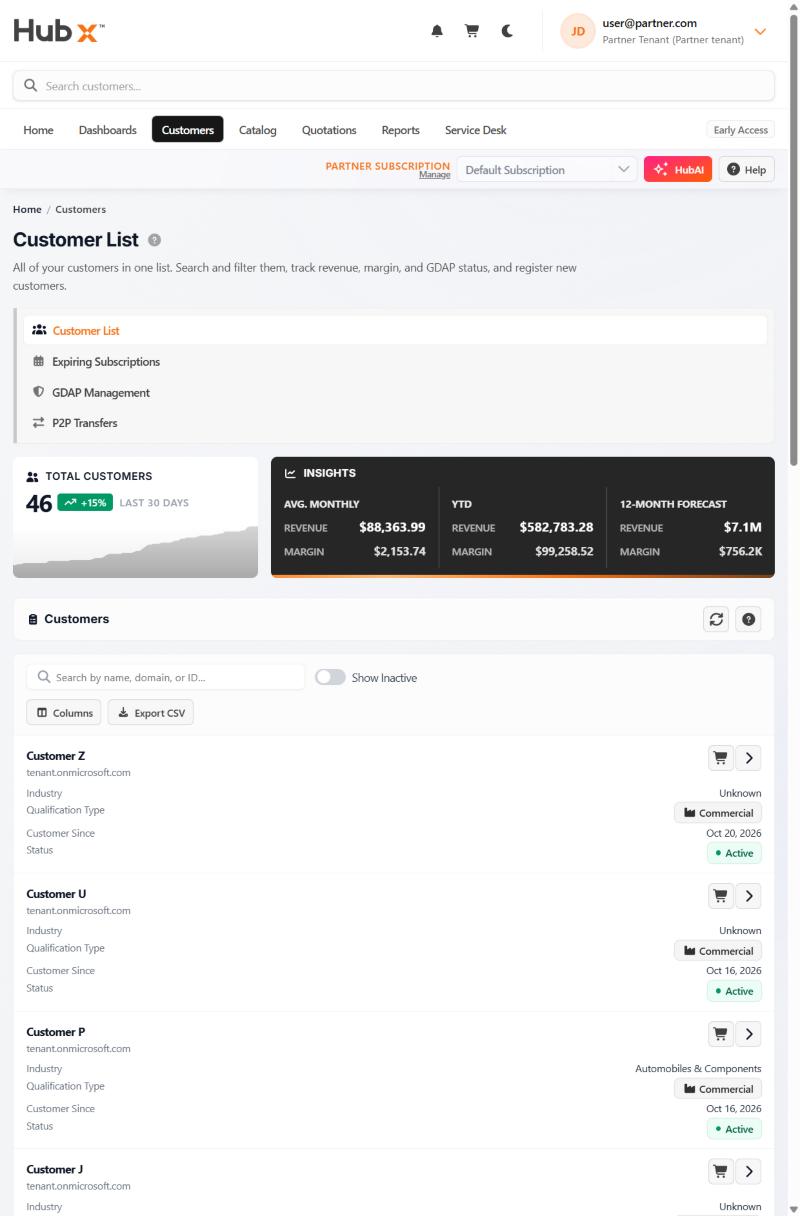
In HubX
The customer list a reseller works from.
Customers with their status and qualification, an insights strip for revenue, margin and forecast, and tabs for expiring subscriptions, GDAP management and partner-to-partner transfers.
Getting started
From application to first billing run.
- 1
Apply
Tell us about your business, your customers and the Microsoft workloads you sell.
- 2
Set up your organisation
Partner organisation, users and roles in HubX.
- 3
Bring customers in
Register new customers or import existing tenants; each customer accepts MSP Hub as reseller from a link.
- 4
Move or buy subscriptions
Eligible existing subscriptions move by partner-to-partner transfer; new purchases go through the catalog.
- 5
Go live
Billing subscriptions and remittance details are set before the first billing run.
Questions
What resellers ask first.
Who bills whom?
MSP Hub bills you as the partner. HubX generates the invoices your customers receive, with your remittance details, and you collect from them.
Do my customers see MSP Hub?
Customers accept MSP Hub as their Microsoft reseller, which is how the CSP program works. Their invoices carry your brand and remittance details.
Can MSP Hub's services team work for my customers?
Yes. Projects and managed operations can be delivered for your customers by MSP Hub's practices. How that is presented and priced is agreed with you.
Next step
Apply as a reseller.
Tell us about your customers and the workloads you sell. The partner team replies by email.