

Skip to content

Microsoft licensing · HubX

Microsoft licensing, in plain view.

Buy or resell Microsoft through MSP Hub and see each customer's products, renewals and invoices in HubX. When the job goes past the license, our engineers run the migration, the monitoring or the build.

Licensing for

  • Microsoft 365
  • Azure
  • Copilot
  • Dynamics 365
Actual HubX UIDemo data
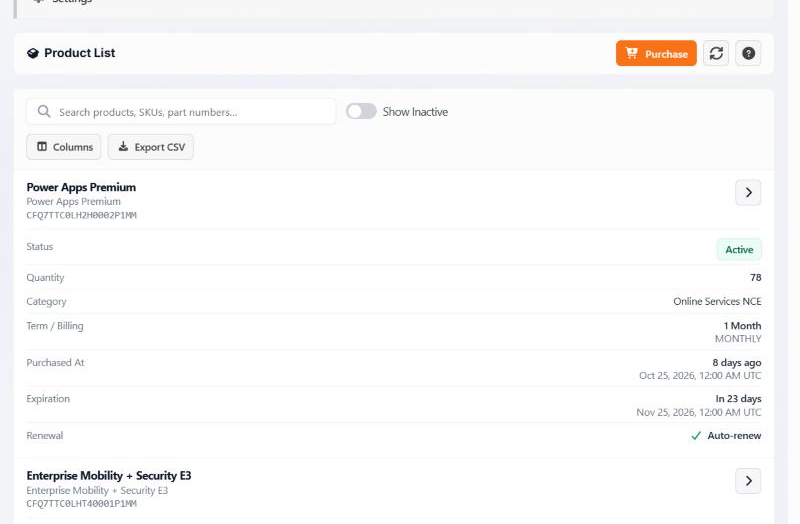
  1. Close-up of the record header: Power Apps Premium, SKU CFQ7TTC0LH2H0002P1MM. Demo data.
  2. Close-up of the record values: Active; 78; Online Services NCE; 1 Month, monthly; purchased 8 days ago, Oct 25, 2026; expires in 23 days, Nov 25, 2026; auto-renew. Demo data.
  1. Which product, which SKUProduct name and its Microsoft SKU code.
  2. Status, seats and termActive or not, quantity, category, and how the commitment bills.
  3. When it ends, what happens nextPurchase date, expiration and the renewal setting, on one record.

Captured November 2026 · Close-ups of this one screen, pixels unchanged; labels and outlines are added by this page.
Customer products

Actual HubX UI · Demo data · Captured November 2026

Actual HubX customer products screen with demo data. A Power Apps Premium record shows status Active, quantity 78, a one-month term billed monthly, expiration in 23 days and auto-renew on.

How MSP Hub is organized

A platform you log in to. Three teams that do the work.

Start from your question. HubX is the product; the three practices are MSP Hub teams that sit beside HubX, not inside it.

The company

MSP Hub sells Microsoft licensing, makes HubX and runs the three practices. Whichever you use, you deal with one company.

  1. HubXPlatform

    Where do I see licenses, purchases, renewals and invoices?

    Customer products, catalog purchasing, quotations, renewals, invoices, reports and Service Desk, in one portal.

  2. Professional ServicesPractice

    Who runs a migration, tenant move or security project?

    Plan and deliver the change: moving mail, identities, devices and data without losing track of who owns what.

    • Microsoft 365 & Exchange migrations
    • Tenant-to-tenant merges
    • Intune & Autopilot
    Full scope (11)
    • Microsoft 365 and Exchange migrations
    • Tenant-to-tenant merges
    • Google Workspace to Microsoft 365
    • Intune and Autopilot
    • Teams Phone
    • Windows 365 and Azure Virtual Desktop
    • Microsoft Defender
    • Microsoft Purview
    • Conditional Access with Entra ID governance
    • Power Platform and Power BI
    • Microsoft Fabric architecture
  3. Managed ServicesPractice

    Who looks after the environment after go-live?

    Monitoring, incident response, reporting and optimization, with Service Desk tickets both the customer and the partner can see.

    • Monitoring & incident management
    • Priority and SLA state in HubX
    • Reporting & optimization
    Full scope (5)
    • 24/7 monitoring of managed environments
    • 24/7 incident management for managed environments
    • Reporting and optimization
    • Service Desk tickets with priority and SLA state, visible to customer and partner
    • Licensing and billing support during business hours
  4. Development & AIPractice

    Who builds the app, pipeline or agent we still need?

    Applications, pipelines and automation scoped to a real workflow.

    • .NET & cloud-native apps
    • CI/CD & infrastructure as code
    • Copilot work & purpose-built agents
    Full scope (5)
    • Custom .NET and cloud-native applications
    • CI/CD pipelines
    • Infrastructure as code
    • Microsoft Copilot work
    • Purpose-built agents and automation

HubX, powered by MSP Hub

See the product before the pitch.

Screens from HubX as it ships, with demo data. Each one says what a buyer can check for themselves.

Actual HubX UIDemo data
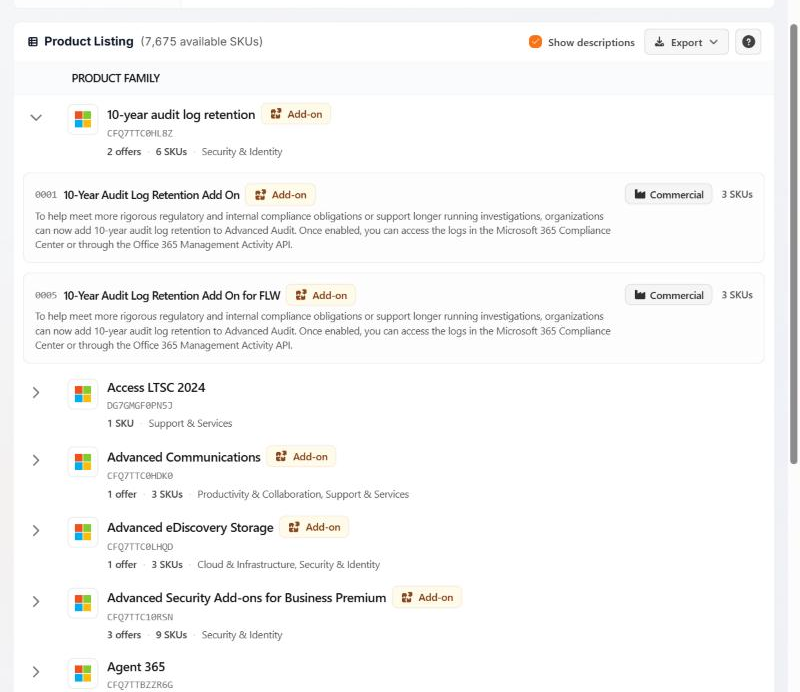
  1. A product family

    Close-up of the expanded family 10-year audit log retention, marked Add-on: 2 offers, 6 SKUs, Security & Identity. Demo data.

    Name, add-on label, SKU code, and how many offers and SKUs it holds.

  2. One offer inside it

    Close-up of offer 0001, 10-Year Audit Log Retention Add On, marked Add-on.

    The first offer in that family, also labelled as an add-on.

  3. The same offer, right end of its row

    Close-up of a Commercial qualification label and the text 3 SKUs.

    Its qualification, Commercial, and its three SKUs.

Buy from a catalog filtered to you

Browse by product family, then open the offers inside it. Each offer shows its qualification, such as Commercial, and how many SKUs it carries.

Product catalog

Actual HubX UI · Demo data · Captured November 2026

Actual HubX product catalog with demo data. The 10-year audit log retention family is expanded to show two add-on offers, each marked Commercial with three SKUs.

Captured November 2026 · Close-ups of this one screen, pixels unchanged; labels and outlines are added by this page.

Actual HubX UIDemo data
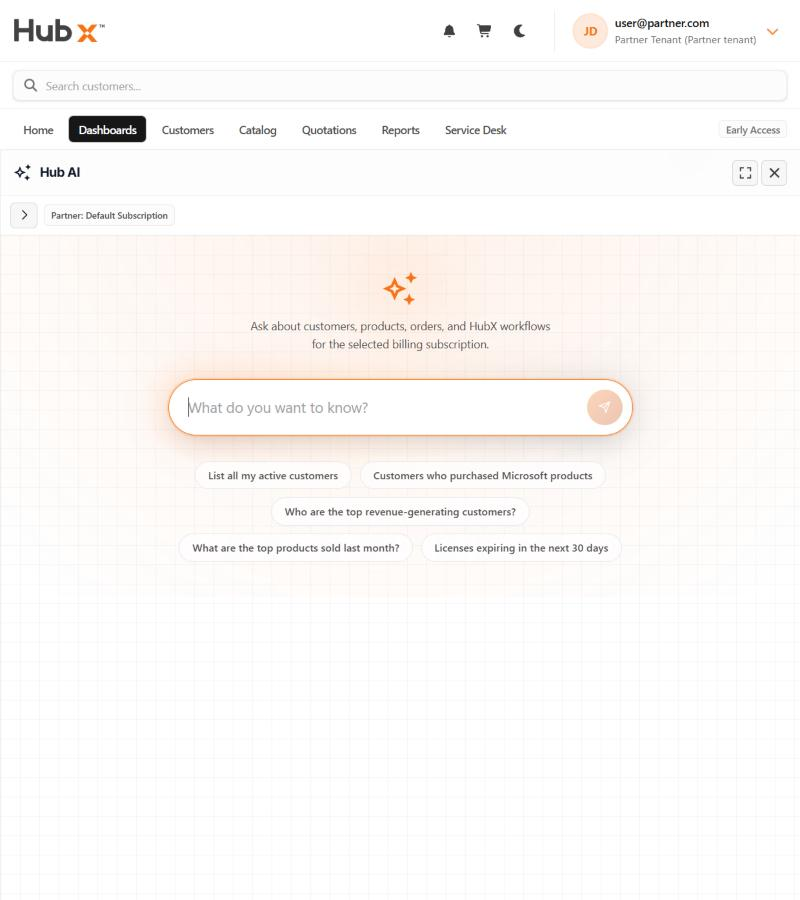
  1. Scope

    Close-up of a chip reading Partner: Default Subscription.

    The billing subscription HubAI answers from, shown above the prompt.

  2. What it takes

    Close-up of the text: Ask about customers, products, orders, and HubX workflows for the selected billing subscription.

    HubAI's own line about what it can be asked.

  3. A suggested question

    Close-up of a suggested question: Licenses expiring in the next 30 days.

    One of five suggestions under the prompt. The full screen shows all five.

Ask HubAI about one subscription

A question scoped to the selected billing subscription returns a table you can inspect.

Read-only today. HubAI answers from the selected billing subscription and cannot place orders.

HubAI

Actual HubX UI · Demo data · Captured November 2026

Actual HubAI prompt screen with demo data. A chip reads Partner: Default Subscription. The screen says: Ask about customers, products, orders, and HubX workflows for the selected billing subscription. Suggested questions include List all my active customers and Licenses expiring in the next 30 days.

Captured November 2026 · Close-ups of this one screen, pixels unchanged; labels and outlines are added by this page.

Who we work with

Which of these sounds like you?

How you buy, what you see in HubX and how you work with our team depend on your business model.

You resell through MSP Hub. Your customers see your brand on their invoices.

Your customers' tenants, orders, renewals and invoices in one console.

Resell Microsoft through MSP Hub without building your own licensing desk, and call on MSP Hub's services bench when a customer needs project or operations work.

  • Licenses, orders and renewals per customer tenant
  • Partner-branded customer invoices with your own remittance details
  • Margin per customer, and what changed since the last period
  • Partner-to-partner transfers handled by MSP Hub

Who answers, and when.

24/7Monitoring and incident management
For environments under a Managed Services agreement.
Business hoursLicensing and billing support
Questions about licenses, orders and invoices. Separate from managed-environment cover.

Next step

Ask for a demo, or tell us about the project.

  1. 01 · See HubX

    I want to see HubX with my own licensing scenario.

    Opens the demo request form. Sending it asks the team to get in touch; it does not book a time.

  2. 02 · A project

    I have a migration, a managed environment or a build in mind.

    Opens the contact form for MSP Hub's services team.

  3. 03 · Direct

    I'd rather email or call.

    MSP Hub sales.

  4. 04 · Customers

    I already use HubX.

    Opens the HubX sign-in page.