
Microsoft licensing
Microsoft licensing, with the dates in front of you.
MSP Hub sells Microsoft licensing through Microsoft's Cloud Solution Provider (CSP) program. The licensing desk quotes it, and every subscription, term, renewal date and invoice is visible in HubX.
What you can buy
Workloads the licensing desk quotes.
Availability, terms and prices depend on the product and your organisation's qualification.
01
Microsoft 365
- Business Basic, Standard and Premium
- Microsoft 365 E3, E5 and F3
- Exchange, SharePoint and Teams
02
Copilot & Teams Phone
- Copilot add-ons for Microsoft 365
- Teams Phone and calling plans
- Teams Rooms
03
Security & compliance
- Microsoft Defender
- Microsoft Purview
- Intune and Entra ID
04
Azure
- Azure plan (consumption)
- Reservations and savings plans
- Azure Virtual Desktop
05
Business applications
- Dynamics 365
- Power Platform
- Power BI
06
Windows & servers
- Windows 365
- Windows Server and SQL Server subscriptions
- Perpetual software
Terms
Monthly, annual or three-year, where Microsoft offers them.
New Commerce Experience (NCE) rules apply to license-based subscriptions whoever you buy from.
Monthly
For seats that change. Billed each month.
Annual
A one-year commitment, billed monthly or up front.
Three-year
Where Microsoft offers it for the product, for the most stable workloads.
The seven-day window.
NCE license-based subscriptions normally allow cancellation with a prorated refund within seven days of purchase or renewal, and seat reductions within seven days of adding them. After that, the commitment runs for the term. Compare term and billing-frequency prices per SKU before committing.
Qualification
You see the offers you qualify for.
Commercial
Standard commercial offers for businesses.
Nonprofit
Nonprofit offers, quoted against your Microsoft nonprofit eligibility.
Education
Academic offers for qualified institutions.
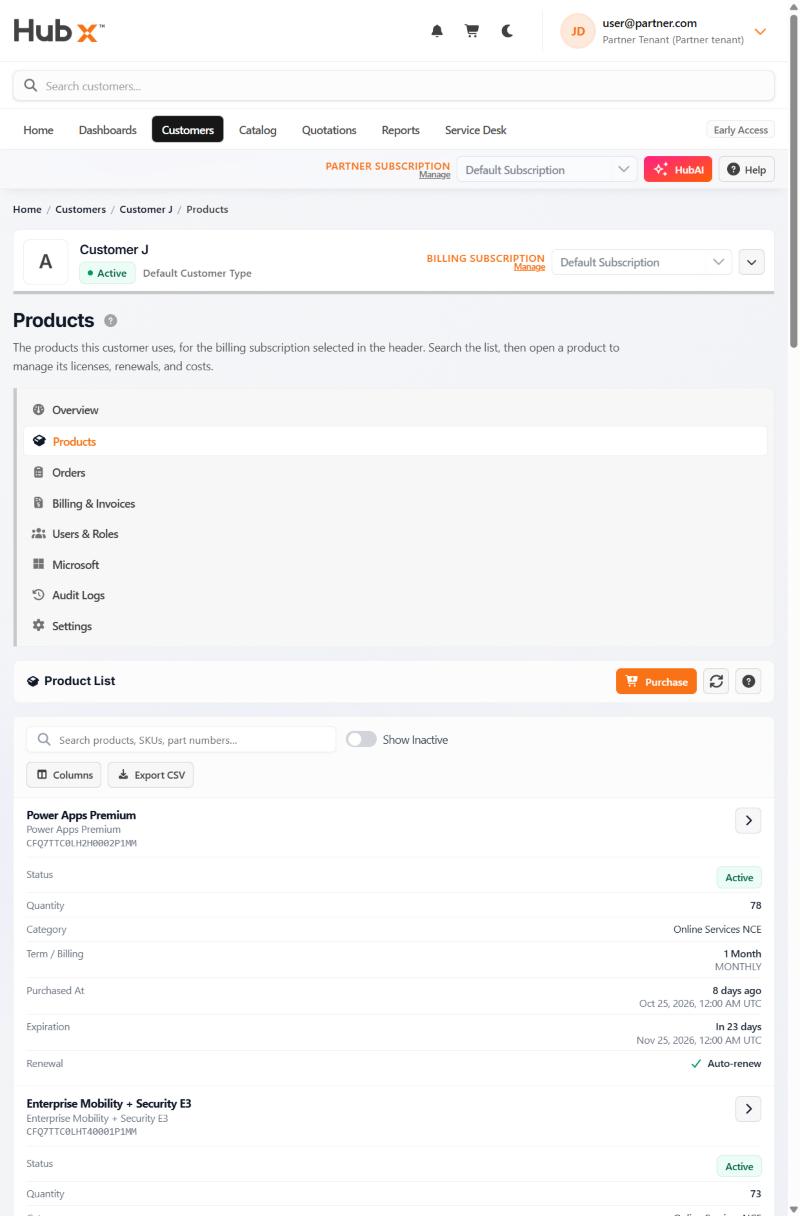
In HubX
Every subscription, with its term and renewal date.
Each subscription shows its status, quantity, term and billing frequency, purchase and expiration dates, and whether it auto-renews.
- Upcoming expirations are flagged on the home page
- Invoices and statements are in the same portal
Where to go next
Pick the situation you are in.
Switching from another provider
Move eligible CSP subscriptions by partner-to-partner transfer, and see what does and does not move.
Leaving an Enterprise Agreement
The questions to settle before moving from an EA to CSP.
Other vendors on the same quote
Ask for non-Microsoft software and hardware alongside your Microsoft order.
Buying for your own company
Licensing, projects and managed operations from one company.
Microsoft sources
- Cloud Solution Provider program overview (Microsoft, opens in a new tab)
- New Commerce Experience cancellation policy (Microsoft, opens in a new tab)
- Transfer billing ownership from one partner to another (Microsoft, opens in a new tab)
- Granular delegated admin privileges (GDAP) introduction (Microsoft, opens in a new tab)
Next step
Tell the licensing desk what you need.
Products, seat counts and timing. You will hear back by email during business hours.